




Skip to content Skip to footer

Planning an AV project? Talk to our team

Advanced Teams Rooms Solutions

Connect across the hybrid workspace with Microsoft Teams Rooms

Microsoft Teams Rooms bring the Teams platform into physical meeting spaces with certified hardware, one-touch join and cloud-based management.

For organisations running Microsoft 365, Teams Rooms are the most natural way to extend collaboration from the desktop into every meeting room. We design and deploy Teams Rooms from small huddle spaces to large boardrooms, ensuring consistent quality and simple management across every location.

What Teams Rooms Bring to Your Meeting Spaces

Rooms That Join Meetings Independently

Rooms That Join Meetings Independently

A Teams Room joins calls on its own. Scheduled meetings appear on the touch controller, the room connects with one press and the call stays active regardless of who walks in or out. The room is the meeting device.

Cloud Managed from Day One

Cloud-Managed from Day One

Every Teams Room device is visible in Teams Admin Centre with firmware status, health monitoring and usage data. IT manages every room from one dashboard rather than visiting rooms individually.

Audio Quality for AI Powered Meetings

Audio Quality for AI-Powered Meetings

Microsoft Copilot generates transcripts, summaries and action items from the room audio feed. Certified microphones and DSP produce the clean signal that AI needs for accurate, usable output.

Rooms That Join Meetings Independently

Rooms That Join Meetings Independently

A Teams Room joins calls on its own. Scheduled meetings appear on the touch controller, the room connects with one press and the call stays active regardless of who walks in or out. The room is the meeting device.

Cloud Managed from Day One

Cloud-Managed from Day One

Every Teams Room device is visible in Teams Admin Centre with firmware status, health monitoring and usage data. IT manages every room from one dashboard rather than visiting rooms individually.

Audio Quality for AI Powered Meetings

Audio Quality for AI-Powered Meetings

Microsoft Copilot generates transcripts, summaries and action items from the room audio feed. Certified microphones and DSP produce the clean signal that AI needs for accurate, usable output.

Key features of Actis Microsoft Teams Rooms

team rooms

Independent Meeting Devices, Not Laptop Accessories

One-Touch Join

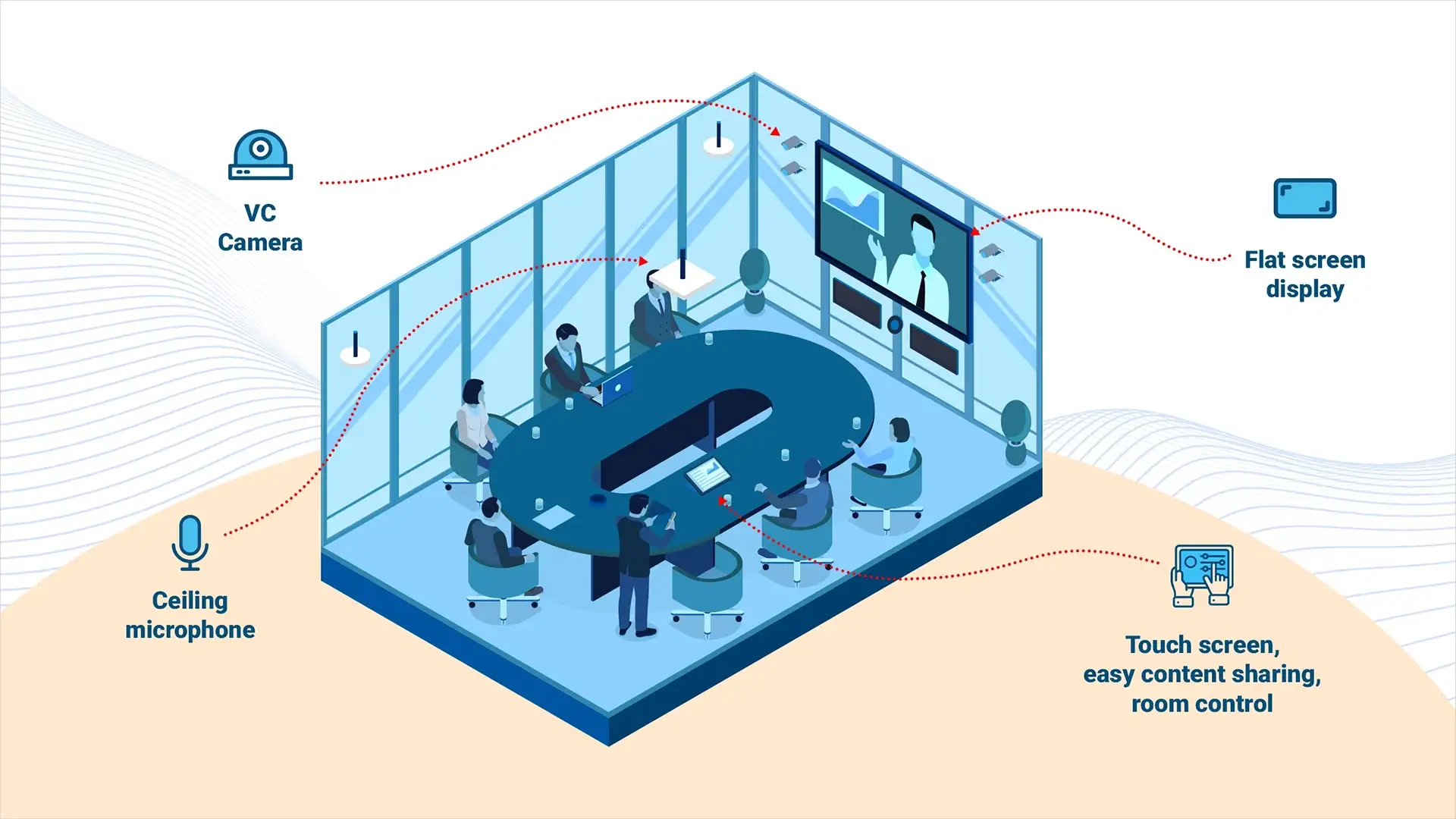
Scheduled meetings appear on the room’s touch controller. Press join and the room connects with camera, audio and content sharing active. No laptop required.

Copilot-Ready Audio

Ceiling microphones and DSP tuned for Microsoft Copilot transcription accuracy. The difference between useful AI summaries and unusable ones starts with the room’s audio quality.

Cloud-Managed via Teams Admin Centre

Every device visible in Teams Admin Centre with firmware status, health monitoring and remote configuration. IT manages every room from one dashboard.

Scalable from Huddle to Boardroom

The same Teams Room experience in every room size. Video bars for huddles, multi-camera systems for boardrooms, all running the same platform with consistent controls.

Wireless and wired content sharing from any device. Visitors and guests can present without installing software or requesting access.

Technologies We Deploy
Teams-Certified Video Bars Touch Controllers Ceiling Mic Arrays Teams Admin Centre PTZ & AI Cameras Room Scheduling Panels Wireless Sharing

Trusted by

AV, collaboration and lighting infrastructure for leading organisations

iffco
New Client logo amarchand re
New Client logo Edelweiss re
New Client logo coca cola
Audio Visual Systems Integration
250,000+
rooms built across India
50+
Years
11
Cities
60+
Locations
Take just 2 minutes to complete this form
What brings you here today?
What kind of organisation are you from?
Which solution are you looking for?
Select all that apply
How many spaces or rooms are involved?
What is your approximate budget?
Optional — helps us recommend the right solution
When do you need this implemented?
Which city is the project in?
Select all that apply
or select specific cities
Actis offices
Other cities
Almost done. Your details.
Please enter a valid email address.
Something went wrong. Please try again or call us on +91 22 3080 8000.
Product enquiry — Step 1 of 4
What are you looking for?
Product enquiry — Step 2 of 4
What is your approximate budget?
Optional — helps us recommend the right option
Product enquiry — Step 3 of 4
When do you need this?
Product enquiry — Step 4 of 4
Almost done. Your details.
Please enter a valid email address.
Something went wrong. Please try again or call us on +91 22 3080 8000.
Service contract — Step 1 of 4
Already an Actis customer and need to log a service request? Click here
What equipment needs to be covered?
Service contract — Step 2 of 4
Who installed or currently services this equipment?
Service contract — Step 3 of 4
How many locations or rooms need to be covered?
Service contract — Step 4 of 4
When do you need cover to start?
Service contract — Almost done
Your details.
Please enter a valid email address.
Something went wrong. Please try again or call us on +91 22 3080 8000.
Thank you, there.
Our team will be in touch within one working day.
faq

Actis FAQs

Core components include a compute module (e.g., Teams-certified mini PC), touch console, camera, speakers, microphones and display. Audio visual equipment for Teams Rooms varies by room size, determining whether soundbars, PTZ cameras, or ceiling mics are used.

Basic includes core meeting functionality for up to 25 devices, ideal for small setups. Pro adds advanced features like remote device management, room analytics, intelligent cameras and Microsoft Defender integration for larger or enterprise environments.

Yes, with the appropriate Teams Pro license, these rooms can host and broadcast large-scale webinars or Town Halls. Enhanced camera control and stage views help optimise the visual experience, with Teams Room event AV support enhancing overall event delivery.

Teams Rooms are optimised for Microsoft Teams but support direct guest join for Zoom and Webex meetings. For rooms that need to work with any platform equally, we can deploy a BYOM configuration alongside the native Teams Room experience.

Android-based Teams Rooms are simpler, more affordable devices suited to smaller rooms. Windows-based systems support more advanced configurations with multiple cameras, displays and peripherals for larger or more complex spaces.

Yes. Teams Admin Centre provides a single dashboard for device inventory, health monitoring, firmware updates, usage analytics and remote troubleshooting across your entire room infrastructure.

Copilot uses the room’s audio feed to generate real-time transcription, meeting summaries and action items. The accuracy depends entirely on audio quality, which is why certified ceiling microphones and DSP processing matter.