
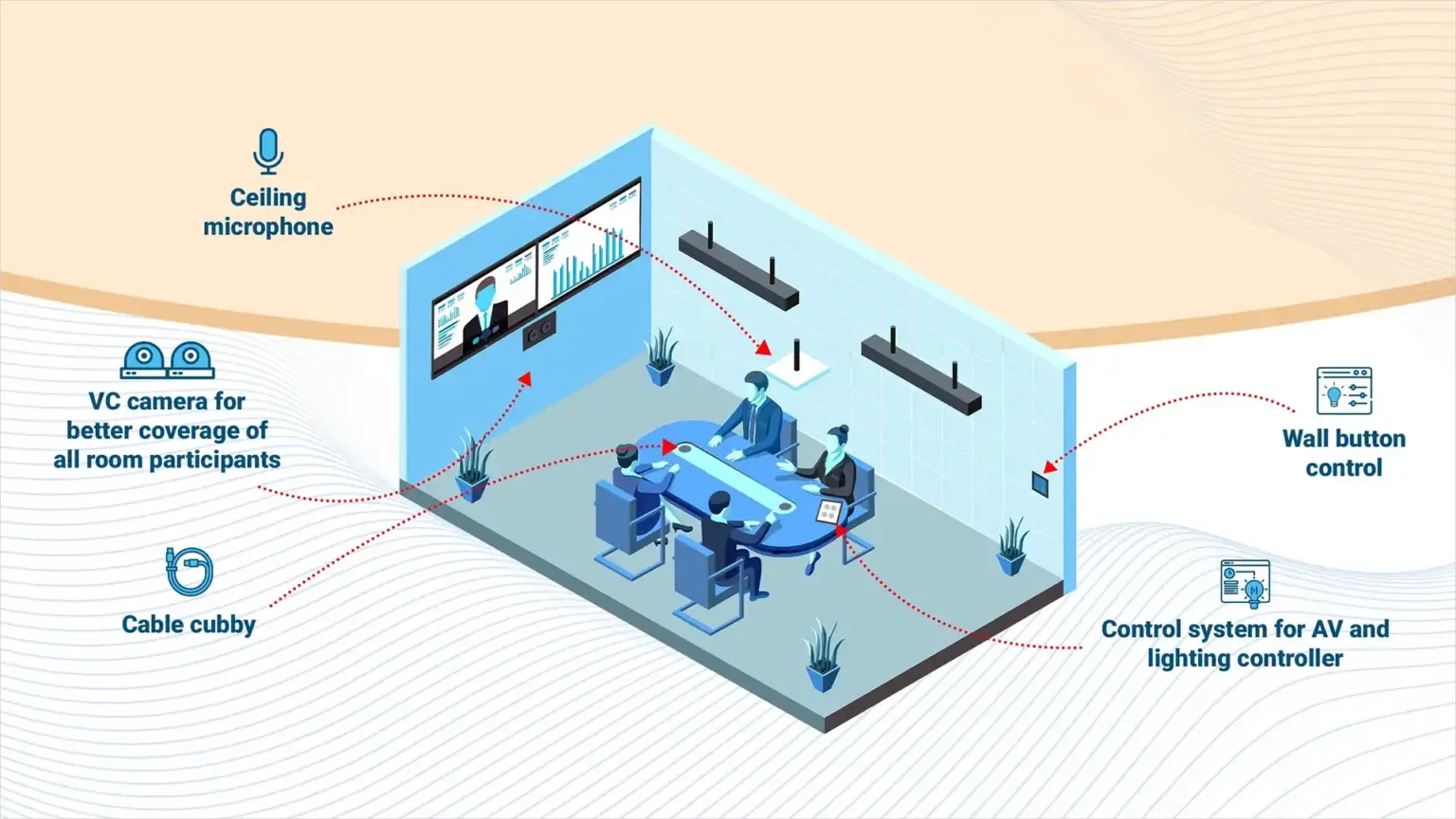
Enterprise-wide Zoom Rooms deployment made simple
Zoom Rooms bring the Zoom platform into physical meeting spaces with dedicated hardware, one-touch join and cloud-based management.
For organisations that run on Zoom, these rooms deliver the same intuitive experience people know from their laptops, but with room-grade cameras, microphones and displays that transform the meeting quality. We deploy Zoom Rooms at enterprise scale with consistent standards across every space.
Extending the Zoom Experience Into Every Room
Your teams use Zoom every day on their laptops. But when they walk into a meeting room, they plug in a laptop, connect the room audio manually and hope the camera works. The room is not a Zoom device. It is a screen with peripheral equipment that someone has to configure for every call. Zoom Rooms change this entirely.
From Laptop Calls to Room-Grade Quality
A dedicated Zoom Room uses room-grade cameras and microphones that are always selected and always on. The experience is consistent every time, without anyone needing to configure audio settings.
Room Usage Intelligence
Zoom Room management gives IT visibility into how rooms are used, which spaces are booked but empty and which devices need attention. Data that helps optimise your room infrastructure over time.
Smart Gallery Needs the Right Camera
Zoom Smart Gallery creates individual frames for each participant, but it needs a room camera positioned to see everyone. Proper camera placement lets Smart Gallery deliver the gallery views that make hybrid meetings work.
Key features of Actis Zoom Rooms
Dedicated Room Systems, Consistent Experience
We deploy Zoom Rooms as dedicated room systems that join meetings, share content and capture everyone in the room without any laptop. AI Companion integration, Smart Gallery views and cloud management from day one.
One-Touch Join
Scheduled Zoom meetings appear on the room controller. Press join and the room connects with camera, microphone and display active. Walk in, sit down, start talking.
AI Companion Integration
Zoom AI Companion generates meeting summaries, smart recording highlights and action items. Room-grade audio makes the AI output accurate and useful rather than garbled.
Smart Gallery
AI-driven camera views that frame individual participants and create gallery views from a single room camera. Remote attendees see faces, not a wide shot of the table.
Cloud-Managed at Scale
Every Zoom Room visible in the Zoom admin portal with device health, firmware status, usage data and remote troubleshooting. IT manages every room from one place.
Hardware-Agnostic Flexibility
Zoom Rooms work with certified hardware from multiple vendors. Choose the camera, microphone and display combination that fits each room size and budget without platform lock-in on the hardware side.
Actis FAQs
Zoom Rooms are dedicated hardware-based conferencing spaces that offer a consistent, one-touch join experience. Unlike standard Zoom meetings, they support room scheduling, proximity join and enterprise-level control, making them a key part of Zoom conference room solutions.
Zoom Rooms are cloud-managed and easily scaled across offices. Central IT can provision and monitor multiple rooms with consistent policies, updates and diagnostics from a single dashboard, making them an integral part of Zoom Room solutions.
Zoom Rooms support AES 256-bit encryption, role-based access, secure room provisioning and SSO. Admins can enforce meeting policies, control access and receive alerts on unusual activity, making Zoom AV solutions a secure and reliable choice for modern collaboration.
Zoom Rooms support SIP/H.323 interoperability for standards-based calls. For Teams or Webex meetings, users can join via the room’s BYOD mode by connecting a laptop. Native cross-platform join is improving but currently works best within the Zoom ecosystem.
It depends on room size. For huddle rooms, an all-in-one video bar is usually sufficient. For larger rooms, we recommend separate PTZ or AI cameras, ceiling microphones and dedicated compute. We select from certified hardware that fits each space.
AI Companion uses the room’s audio and video feeds to generate meeting summaries, highlight key moments and extract action items. Audio quality is critical. Certified room microphones and DSP produce the clean signal that AI needs to work accurately.
Yes. Zoom Rooms can display branded content, announcements or scheduling information when the room is not in use. This is managed centrally through the Zoom admin portal.