


In many hybrid meetings, the same problem keeps surfacing. Some people in the room appear sharp and clear on screen while others drift in and out of view. Remote attendees often end up staring at a wide shot of a table instead of the people who are actually speaking. Over time this changes how conversations flow and how included people feel.
For this to work, participant equity matters. Everyone in the room should appear with roughly the same clarity and presence on screen. That is hard to achieve when a single camera is trying to cover an entire space. The way tables are arranged, where people sit and how far they are from the lens all work against it. With more than one camera, the system can choose better angles, switch views based on where people are seated and frame speakers in a way that feels natural.
Framing everyone fairly: The future of hybrid meetings
As organisations began paying closer attention to how participants appeared on screen, room designers moved beyond single camera layouts. Early hybrid rooms often added a second camera to improve coverage. This helped reduce blind spots and gave remote viewers a wider sense of the table.
That approach became more useful once basic speaker tracking entered meeting rooms. When someone stood up or shifted in their chair, the camera could follow them instead of leaving them half out of frame. Intelligent framing technology pushed this further by analysing the video feed and adjusting the shot so faces stayed properly positioned.
Multi camera systems take this one step beyond. Instead of relying on one wide angle lens, the software can choose from several cameras placed around the room. This creates a more natural front facing view of each participant, which becomes especially important in medium and large rooms.
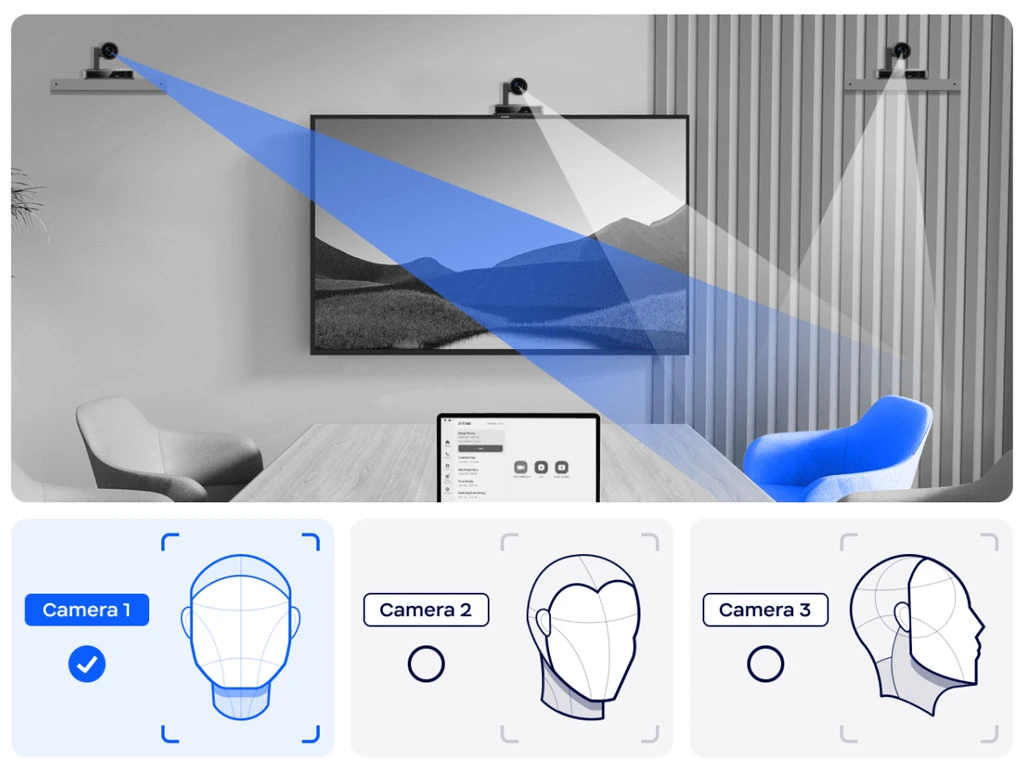
How this plays out in real organisations
We have seen this shift make a difference in organisations that rely heavily on hybrid work.
A client of ours, a financial services company with teams spread across three cities, moved to a multi camera layout after remote staff said they struggled to follow discussions. In the old setup, they could hear the room but they could not always see who was speaking. Once multiple cameras and intelligent framing were introduced, they could follow faces, reactions and small cues that are easy to miss in a wide shot. Their participation in meetings increased almost immediately.
The above is an example of why the best multi camera systems for video conferencing are no longer limited to very large rooms. With thoughtful placement and the right software, they can be scaled to fit almost any meeting space.
Intelligent framing in practice
Multi camera systems provide the physical coverage in a room. Intelligent framing is what turns that coverage into something useful.
Instead of showing a single wide view of a table, the system decides what should be visible at any given moment. It follows the flow of the conversation rather than locking the camera into one fixed angle.
AI analyses the video feed to recognise faces and movement, then keeps people in view as they speak. The result is that remote participants see the person who is actually talking instead of a distant group shot. This makes conversations easier to follow because the visual focus matches what is being said.
It also changes how people behave in the room. Participants do not have to shift seats, lean forward or repeat themselves just to stay visible. When the framing happens quietly in the background, attention stays on the discussion.
At a technical level, intelligent framing is driven by three core capabilities.

- Auto tracking cameras: AI powered cameras can recognise faces and follow movement in real time. When someone starts speaking, the camera adjusts its focus and zoom so that person stays clearly in view. This removes the need for manual camera control and makes remote attendees feel more connected to the room.
- Voice activity detection: Voice activity detection, often called VAD, uses audio signals to identify who is speaking. The camera then pans or zooms toward that person. This is especially useful in larger rooms where people may be seated far apart and visual tracking alone is not enough.
- AI enhanced content detection: Some systems can also recognise when content such as a whiteboard or a presentation is being used. The camera reframes the shot to include what is being shared, so remote participants see both the speaker and the material without losing context.
Together, these features allow a multi camera setup to behave like a responsive visual system rather than a collection of static lenses.
How multi camera systems scale from small rooms to boardrooms
One of the biggest misunderstandings about multi camera video conferencing is that it is only meant for large boardrooms. In practice, the same ideas work just as well in small spaces.
In a huddle room with four or five people, two cameras are usually enough. One looks across the table. The other covers the main display or whiteboard. Intelligent framing technology decides which view to use, depending on who is speaking.
Medium sized meeting rooms benefit from three or four cameras placed along the walls. This gives the system more angles to work with and removes blind spots where someone might otherwise sit out of view.
Large boardrooms, training rooms and town hall spaces use the same approach but with more coverage. Instead of a single distant view of a long table, the room is broken into zones. Each zone has its own camera so that every voice and every face remains clear.
Typical camera layouts by room size
| Room type | Typical capacity | Cameras used | What it achieves |
|---|---|---|---|
| Huddle room | 3 to 6 people | 2 | Clear view of faces and shared screen |
| Small meeting room | 6 to 10 people | 2 | No blind spots, better speaker focus |
| Medium meeting room
|
10 to 15 people | 4 to 6 | Natural looking front facing views |
| Boardroom or training room | 15 to 30 people | 6 to 10 | Full room coverage with smooth framing |
| Town hall or multipurpose space | 30 plus | 8 to 12 | Flexible coverage for changing layouts |
Common mistakes that reduce quality
Even the best technology can fall short if it is set up poorly.
Placing cameras too high is one of the most common errors. This makes people look small and disconnected. Another issue is putting all cameras on one wall, which leaves half the room stuck with side-on views.
Lighting also plays a big role. Bright windows behind participants can make faces harder to detect. Balanced lighting across the room gives the AI better visual information to work with.
Using too many different camera brands in the same room can also lead to uneven image quality and delays when switching views. A consistent system almost always delivers a better experience.
Benefits that go beyond just seeing people
Better visuals are what most people notice first, but multi camera systems improve far more than that.
Audio quality improves because the system knows who is speaking and can steer microphones toward that voice. This keeps background noise under control and makes conversations easier to follow.
Meetings also become less tiring. When faces are clear and the camera follows the conversation naturally, people do not have to strain to understand what is happening. That reduces fatigue across long sessions.
There is also more flexibility in how rooms are used. Furniture can move. People can stand, turn or walk to a board. The system adapts without someone having to manage camera controls.
Over time, these small advantages add up. Meetings feel smoother. Discussions flow more easily. Remote staff feel like part of the room rather than observers.
Switching to a multi camera VC system for your organisation
The goal of hybrid meetings is simple. People in the room and people joining remotely should feel equally involved.
Multi camera video conferencing combined with intelligent framing technology moves organisations much closer to that goal. Instead of a single fixed view, the system uses several cameras to capture different angles, speakers and shared content. AI in video conferencing then selects the best view at any moment.
The result is a meeting that feels more natural. Faces are clearer. Reactions are easier to read. The conversation feels closer to how people interact in person.
For organisations that rely on regular hybrid meetings, this is more than a technical upgrade. It is an investment in how teams communicate, make decisions and stay connected across locations.
By choosing the best multi camera systems for video conferencing and setting them up with care, you can create meeting spaces that support your teams today and remain useful as work continues to evolve.
FAQ’s
Multi-camera setups solve the limitations of single-camera systems, which often fail to capture all participants clearly in medium or large rooms. By offering multiple angles, remote attendees get more balanced, frontal views, improving visibility and meeting equity.
Intelligent framing uses AI to detect people, track motion, and decide which camera angle to use automatically. This keeps the active speaker or participants clearly framed at all times, reducing distractions and maintaining engagement throughout the meeting.
AI analyzes video and audio cues to identify who is speaking or presenting in the room. It then switches between cameras dynamically, ensuring clearer visuals and making hybrid meetings feel more natural, smooth, and inclusive.
For medium to large hybrid meeting rooms, typically 2–3 cameras provide optimal coverage. Larger multi-purpose or town-hall style spaces may require several additional cameras to ensure full visibility and flexibility during meetings.
Organisations benefit from more inclusive and equitable hybrid meetings where everyone is clearly visible. The setup enhances collaboration, boosts professionalism, and significantly improves the overall quality of remote and in-room communication.
Camera placement affects how participants appear during a video call. When positioned at eye level, it improves eye contact and keeps the person properly framed, making communication clearer. Proper placement also reduces awkward angles and helps create a more professional and comfortable meeting experience.
Facial tracking cameras enhance video calls by auto-framing and following your face, keeping you centered even when you move.
They also improve quality with features like background blur, eye contact correction, and low-light optimization, making calls more professional and engaging.
AI enhancement features in a laptop camera are very important for video conferencing, as they improve clarity, framing, and overall presentation.
Features like auto-framing, noise reduction, background blur, and low-light correction make calls more professional and distraction-free.