



Understanding how the popular Zoom video conferencing platform has evolved into a great fit for almost any type of enterprise meeting and collaboration space
As businesses grow, they need to find ways to extend their reach or help their teams become more productive and efficient. Video conferencing is now widely accepted as one of the most powerful tools we have to achieve this, which is leading to its wider adoption in the world of business.
As a result, organisations are seeking a single video conferencing system that lets them add more VC-enabled rooms easily. They also realise that employees and teams want a simpler and more flexible experience in video collaboration rooms.

How are Zoom Rooms different from Zoom?
Online video conferencing is where Zoom initially became popular, allowing individuals or organisations the ability to conduct video calls, web conferences or webinars. Renowned for its ease of use, Zoom proved to be something that could be used not just by CEOs but by school kids too.
However, in the early stages, the Zoom video experience was more suited for personal devices — like laptops, smartphones or tablets — than for the enterprise environment which has specialised spaces for meetings and collaboration. One could use these devices in meeting rooms of course – but they came with their own limitations. For example, the camera and microphone built into laptops would be a limitation when larger groups had to meet and the audio and video quality often wasn’t adequate.
Today, Zoom Rooms provide organisations with the capability to bring an enhanced version of the cloud-based Zoom platform experience to different types of video-enabled meeting rooms. So not only does this work well with personal devices when people are at home, on the road or in their individual workspace, but it creates a high-quality video meeting experience in meeting rooms of different sizes.
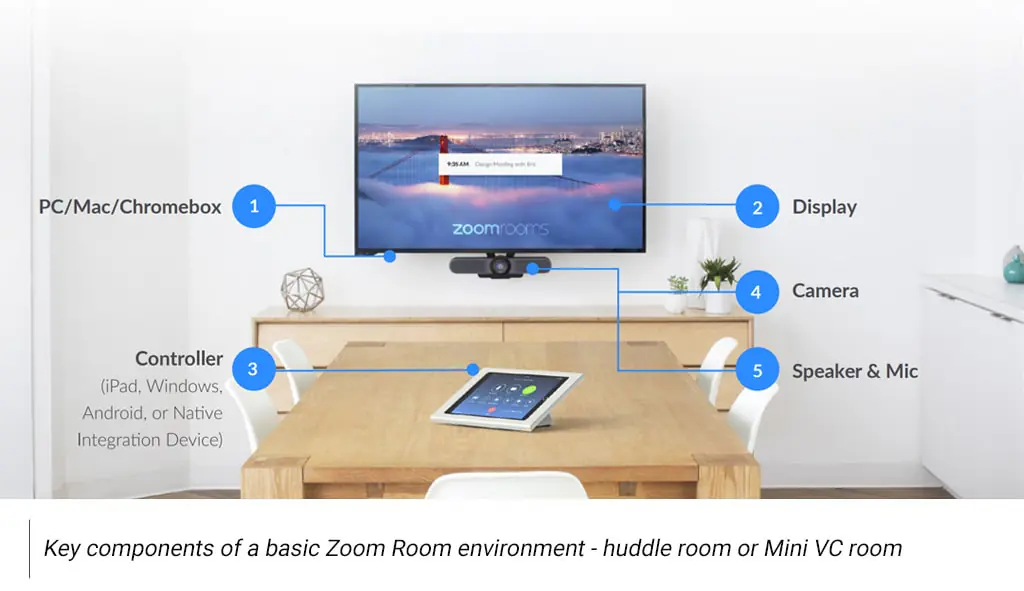
This has made it one of the fastest-growing video conferencing platforms for businesses, with an ever-growing set of enterprise-oriented features.
What benefits are Zoom Rooms creating for organisations?
A key reason for the success and growth of Zoom has been its focus on making the video-conferencing experience as simple as possible for users. It is a lot less complicated than traditional enterprise software, which end-users love. This is a boon for organisations that save considerable time and resources otherwise required to train people.
A cloud-based VC platform like Zoom brings other benefits to organisations too, as it makes it simpler for IT teams to deploy, support and manage. Many organisations choose Zoom Rooms precisely because it provides a good balance between keeping things simple and providing a powerful set of enterprise-ready features.
For enterprise teams looking to adopt Zoom Rooms, there are several benefits:
- Simple yet flexible: Zoom is a very flexible tool with an extremely user-friendly interface and feature set. One-touch join and voice commands help start instant meetings and scheduling meetings is easy too. It supports standards-based SIP/H.323 hardware endpoints and provides a consistent user experience across desktop, mobile and room systems. It can be deployed in rooms of different sizes and for different applications – meetings, training, virtual events etc.
- Powerful collaboration features: While HD video and audio conferencing are at the core of Zoom Rooms, they provide many features that enhance collaboration too. Shared whiteboards, chat, annotation and session recording make it easier for presenters to engage their audience and for teams to collaborate more effectively. Participants can easily save, email or post content to chat.
- Superior meeting experience: Zoom Rooms bring a lot of experience enhancements that make meetings more effective. AI plays a role in improving audio and video capture with multiple cameras and microphones. Zoom auto-detects participants and creates separate camera feeds to create new layouts like Smart Gallery, which helps virtual and in-person participants feel like they are sharing the same space.
- Ready to deploy at scale: Thanks to its cloud-based platform Zoom Rooms can be deployed quickly across hundreds of rooms in different locations. It can be integrated with existing room hardware or implemented quickly with Zoom-certified devices for a seamless experience in modern conference rooms. Live meetings and webinars can be conducted for hundreds of users simultaneously.
- Streamlined room management: Zoom Rooms can be configured and managed via a central administration portal. This makes it easier to deploy, provide remote support and also for more effective monitoring of room hardware. More detailed analytics that helps check meeting participation and optimise room utilisation is also available via the dashboard. Admins have access to alerts, reporting and analytics. They can even track the temperature, air quality and humidity in the room to ensure it’s comfortable for participants.
- Additional features: Zoom’s capabilities also extend outside the VC room. It can be deployed as a work desk phone, virtual receptionist, in kiosk mode and as digital signage on any display. Each of these features uses video to provide better access to information across different spaces in the modern office. Every aspect of your Zoom Room can also be remotely controlled from a mobile device or laptop.
Summary
For most organisations, collaboration is now a strategic priority that can help make critical workflows smoother. Zoom Rooms instantly bring teams closer together, which leads to better sharing of ideas, more productive conversations and effective collaboration.
This makes Zoom Rooms a scalable and secure solution for high-quality video conferencing and real-time collaboration in organisations of all sizes. It is also cost-effective to deploy in meeting rooms as it uses simpler hardware and eliminates the need for travel.
FAQ’s
Cloud VC is now the backbone of enterprise collaboration because it offers flexibility, easy access, and scalability via services like Teams, Zoom, Webex, and Google Meet. It supports hybrid work and gives users reliable, high-quality video experiences from anywhere.
It simplifies deployment and management by reducing on-prem hardware needs and leveraging soft codecs. Cloud platforms also enable one-touch join, room scheduling, recording, and remote management — reducing operational complexity and support overhead.
Cloud VC requires less capital expenditure since only endpoints (room devices) need to be purchased, while the backbone runs on the provider’s infrastructure. It’s also much more scalable, allowing organisations to expand or adapt their VC footprint using subscription plans.
Cloud platforms support a wide range of devices — from smartphones and laptops to certified room systems — thanks to open standards and broad compatibility. This ensures users can join meetings from virtually any device without friction.
While cloud VC offers enterprise-grade security, some organisations (e.g., in government or defence) may still prefer on-prem systems due to data sensitivity. However, for most companies, the benefits of scalability, manageability, and flexibility make cloud VC the stronger choice.