


We explore the most common issues and the proactive strategies enterprises can adopt, to solve recurring AV challenges that can derail collaboration and productivity in modern conference rooms
The challenge is that technology alone cannot deliver this future; it demands intelligent design, proactive support and a commitment to evolving with the way people work.
Compatibility and Interoperability Issues
Conference rooms are rarely closed systems. They must accommodate external guests, BYOD scenarios and legacy infrastructure that may not always align with current platforms. Incompatibility between devices or UC ecosystems can stall meetings and diminish productivity.
Addressing this requires an investment in standards-based systems and certified peripherals. AV-over-IP frameworks, designed with interoperability in mind, ensure that devices communicate seamlessly across platforms.
Example: A large financial institution faced constant connectivity issues when external guests tried to join from non-Microsoft platforms.
Solution: Introducing certified BYOD interfaces and a platform-agnostic UC bridge enabled seamless participation from Zoom, Webex and Google Meet without technical intervention.
Audio Quality Problems
If participants cannot hear clearly, collaboration collapses. Common issues include echo, poor microphone pickup, uneven speaker coverage or intrusive background noise. Such challenges are not just technical; they erode confidence in the meeting process itself.
Mitigating these problems requires thoughtful room design and deployment of professional-grade solutions. Ceiling array or table microphones with intelligent pickup zones, performing room EQ calibration via DSP tools, DSP-based echo cancellation and precise loudspeaker placement create balanced coverage. Acoustic treatments, often overlooked, can be the difference between a functional and an exceptional room.
Example: In a boardroom with 20 participants, uneven microphone pickup caused remote attendees to miss key discussions.
Solution: Ceiling-array microphones with beam forming and DSP-based auto-mixing were deployed to ensure uniform voice capture and clarity for all participants.
Inconsistent User Experience Across Rooms
One of the most common frustrations is the lack of a unified experience across different meeting spaces. When each room has a unique setup comprising different interfaces, controls or equipment, users spend valuable meeting time troubleshooting instead of collaborating.
The solution lies in standardisation. By creating a consistent design blueprint for all meeting spaces, whether small huddle rooms or large boardrooms, organisations ensure that employees encounter familiar interfaces everywhere. Standardised touch panels, one-touch join capabilities and uniform deployment of UC platforms like Microsoft Teams Rooms or Zoom Rooms reduce learning curves and boost efficiency.
Example: A global consulting firm found that teams lost nearly 10 minutes per meeting because each room had a different control interface and conferencing setup.
Solution: We implemented standardised Teams Rooms with identical touch interfaces across all sites, reducing setup time and ensuring a consistent, one-touch start everywhere.
Video Quality and Display Limitations
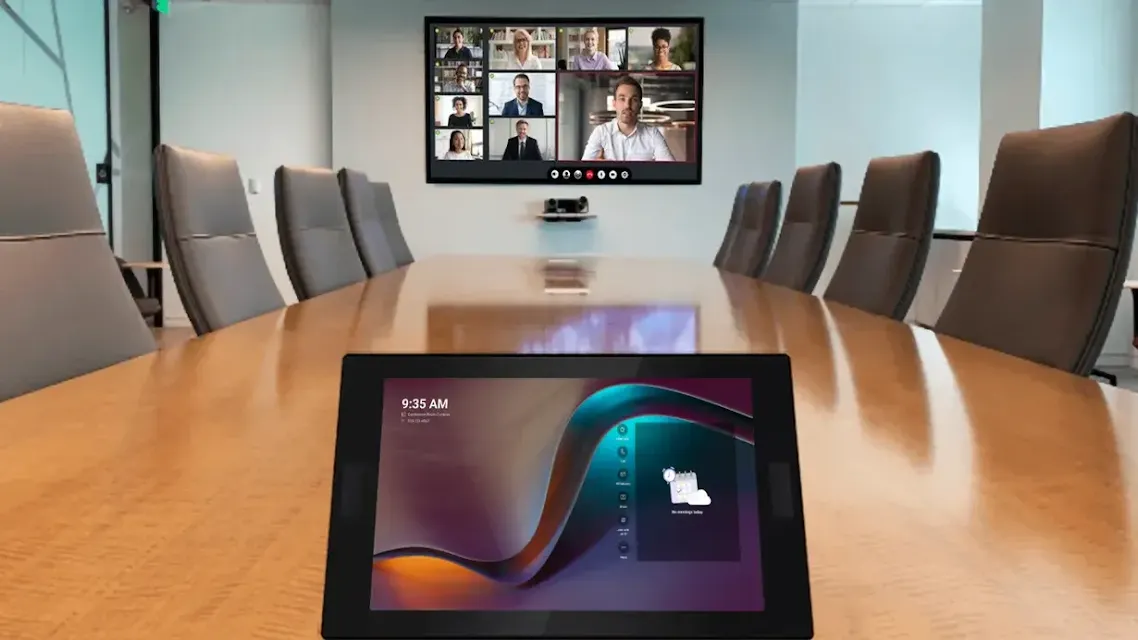
Visual communication is as important as audio, yet many rooms still struggle with inadequate video capture or poor display design. Low-resolution cameras, insufficient lighting and incorrectly sized screens compromise the experience.
The path forward is clear: investment in high-quality PTZ or auto-framing cameras that adapt to the meeting context, coupled with UHD/4K displays or LED walls with high contrast ratios, sized according to seating distance and room dimensions. Equally critical is lighting design tailored for video calls, avoiding shadows, glare or uneven exposure ensures remote participants see everyone clearly.
Example: A multinational’s leadership room used outdated webcams and poor lighting, making remote participants appear shadowed and unclear during executive reviews.
Solution: Upgrading to 4K PTZ cameras with intelligent auto-framing and optimised video lighting transformed the meeting experience into a broadcast-quality interaction.
Connectivity and Bandwidth Constraints
Even the most advanced AV systems falter without a reliable network infrastructure. Bandwidth bottlenecks, lag or dropped connections can derail hybrid meetings, damaging client perception and wasting valuable time. Additionally, inconsistent cable standards (HDMI, USB-C, DP) can cause adapter chaos on conference tables.
Future-ready enterprises treat network readiness and cable standardisation as a foundational layer for AV. This includes dedicated bandwidth allocation for video traffic, redundant internet paths for business continuity, robust wireless coverage to support BYOD usage and clear labelling of connection ports and cables. Coordinating with IT early and defining dedicated AV VLANs, along with proactive bandwidth monitoring and traffic prioritisation, can prevent disruptions before they occur. Providing dual-format inputs (HDMI + USB-C) and implementing wireless presentation systems can provide a comprehensive solution that supports all kinds of devices.
Example: A pharma company experienced frequent video drops during global town halls due to network congestion.
Solution: We conducted a network readiness audit, added dedicated bandwidth for AV traffic and configured QoS policies, eliminating disruptions and ensuring smooth streaming.
Complexity of Control Systems

In many conference rooms, the complexity of AV controls becomes a barrier to effective use. Switching inputs, managing UC platforms, adjusting lighting, or configuring audio often requires technical expertise beyond that of most users.
Simplification is the solution. Unified control systems from leading providers such as Crestron or AMX consolidate all room functions into a single, intuitive interface. Automated presets, for example, “presentation mode” or “video call mode”, further reduce the cognitive load on users, ensuring meetings begin on time and proceed without technical distractions.
Example: In a tech firm’s innovation lab, users required IT support just to switch from a presentation to a video call.
Solution: A single unified control interface was introduced, automating lighting, display inputs and UC controls into one-touch room modes.
Maintenance and Downtime Risks
Unscheduled downtime remains a significant risk, particularly when AV systems are relied upon for high-stakes meetings. Firmware mismatches, device failures or unnoticed wear and tear can surface at the worst possible moment. Common problems also include sudden system reboots or black screens often due to unstable power and overheating of AV racks or projectors.
Using UPS and power conditioning units (APC, Eaton), maintaining proper rack ventilation and temperature sensors and integrating smart power sequencing with the help of control systems can help mitigate a lot of problems. Proactive support strategies such as maintaining a device inventory with IPs, firmware and configs also offer a safeguard. Remote monitoring tools allow integrators and IT teams to detect anomalies before they become failures. Predictive maintenance, coupled with service-level agreements that guarantee response times, transforms AV support from a reactive function into a strategic enabler of uptime.
Example: A major manufacturing client faced repeated downtime because firmware updates across multiple devices weren’t synchronised.
Solution: Remote monitoring and automated firmware management allowed updates to be centrally deployed off-hours, ensuring zero meeting disruption.
Security Concerns in AV and UC
As AV converges with IT, conference rooms increasingly connect directly to enterprise networks. This introduces new vulnerabilities, from unsecured endpoints to outdated firmware, that can be exploited.
Securing AV systems requires adopting IT-grade practices: encryption of AV-over-IP traffic, regular software updates, multifactor authentication for devices and compliance with enterprise security policies. Collaboration between AV teams and IT security groups is no longer optional, it is fundamental to safeguard corporate communications.
Example: A government client discovered that outdated AV firmware posed a vulnerability in its network audit.
Solution: Regular security patching, encrypted AV-over-IP deployment and multifactor authentication brought systems in line with IT security protocols.
Scaling and Future-Proofing
Business needs evolve rapidly and AV systems that cannot adapt quickly become obsolete. Scaling challenges include integrating additional rooms, accommodating larger teams or adopting new collaboration platforms.
Enterprises that design with modularity in mind are best positioned for long-term success. Standards-based AV-over-IP architectures make expansion straightforward, while cloud-managed platforms allow centralised updates and easy integration of new features. By planning for change, organisations avoid costly rip-and-replace scenarios.
Example: A fast-growing SaaS enterprise struggled to integrate new huddle rooms quickly as teams expanded.
Solution: We designed a modular AVoIP infrastructure, allowing plug-and-play scalability where new rooms could be added to the network within hours.
Lack of Skilled On-Site or Remote Support
Even the most advanced systems falter without skilled support staff. Users often face difficulties with basic troubleshooting, while IT teams may lack specialised AV expertise. This knowledge gap results in reliance on external intervention and extended downtime.
The solution combines continuous training for end-users with structured support partnerships. Quick-reference guides, just-in-time video tutorials and remote helpdesk services empower employees to resolve minor issues independently. Managed services agreements with integrators ensure that skilled technicians are always available to address complex challenges.
Example: A retail conglomerate’s regional offices had advanced AV systems but no local technicians to manage daily issues.
Solution: A managed support plan with remote diagnostics and on-demand field support ensured rapid response times across all locations.
The Role of Proactive AV Support Services
The shift from reactive to proactive support is perhaps the most important evolution in enterprise AV strategy. Continuous monitoring, real-time diagnostics and 24/7 remote management prevent issues from disrupting business-critical meetings. Predictive analytics can even flag potential device failures before they occur, allowing pre-emptive intervention.
This is where trusted partners add measurable value. Purchasing onsite service support licenses for VC units (Poly , Cisco , Logitech) adds an added layer of confidence for users. It’s worth noting that these licenses have to be purchased upfront along with the hardware to have direct support of OEM onsite. Additionally, AV consultants, with decades of expertise, can offer end-to-end lifecycle support spanning design, deployment, monitoring, training and managed services. For enterprises navigating the complexities of hybrid collaboration, such proactive support is not merely a convenience but a strategic necessity.
Example: A multinational healthcare company faced recurring call-quality issues despite frequent manual checks.
Solution: Implementing 24/7 proactive monitoring with predictive analytics flagged device issues in real-time—resolving them before meetings were affected.
In Closing
The success of modern conference rooms hinges not only on cutting-edge technology, but also on the strategies used to support it; like stocking spares of critical items to ensure minimal disruption. By addressing the recurring challenges of inconsistency, interoperability, AV quality, connectivity, complexity, maintenance, security, scalability and support, enterprises can transform their meeting environments into reliable, frictionless collaboration hubs.
Organisations that partner with experienced integrators, adopt better AV support and monitoring systems. They embrace proactive support frameworks stand to gain more than just reliable AV, they build a foundation of trust, efficiency and adaptability that strengthens every interaction.
FAQ’s
Regular servicing of equipment is recommended at least once or twice a year, with ongoing remote monitoring to catch issues in between.
Reactive support addresses issues after they occur, often leading to downtime. Proactive support involves continuous monitoring, predictive maintenance and preventative interventions to keep systems running without disruption.
Yes. Legacy systems can often be modernised with cloud-managed collaboration platforms, updated peripherals and AV-over-IP frameworks that extend their lifespan while enabling hybrid collaboration.
By standardising room designs, using the same certified platforms and peripherals and managing them centrally through cloud-based monitoring tools, organisations can deliver a uniform experience at scale.
AV systems are now part of the enterprise IT fabric, which means unsecured devices or outdated firmware can pose risks. Proactive AV support ensures regular updates, compliance with IT security protocols and continuous monitoring to prevent vulnerabilities.
When designing audiovisual systems for modern conference rooms, several factors are crucial:
1) User Needs: Understand the specific needs of the users. This includes the types of meetings, presentations, and collaborations that will take place.
2) Room Acoustics: Consider the room’s size, shape, and materials, which can affect sound quality.
3) Technology Integration: Ensure seamless integration of various technologies like video conferencing, wireless presentation, and digital signage.
4) Ease of Use: The system should be user-friendly, with intuitive controls.
5) Scalability: The design should allow for future upgrades or expansion.
6) Maintenance and Support: Plan for regular maintenance and prompt support to ensure system reliability.
A well-designed AV system can enhance communication, collaboration and productivity.